
Bullet Journal for Beginners: A Calm, No-Art-Skills Start (With a Free Printable Starter Pack)
A bullet journal is a flexible notebook system for organizing tasks, events, and notes with short entries. Created by Ryder Carroll, it combines everyday logging with regular review. To begin, use a notebook and pen, create an index and simple planning pages, then write today’s date and a few useful bullets.
You do not need beautiful handwriting. You do not need a matching set of markers. And you do not need to turn your life into a collection of trackers.
This guide to a bullet journal for beginners starts with five useful page types. You’ll learn what each one does, how to set it up, and what you can leave out.
Your first page can have a crooked line. It can also help you remember tomorrow’s appointment.
Messy counts.
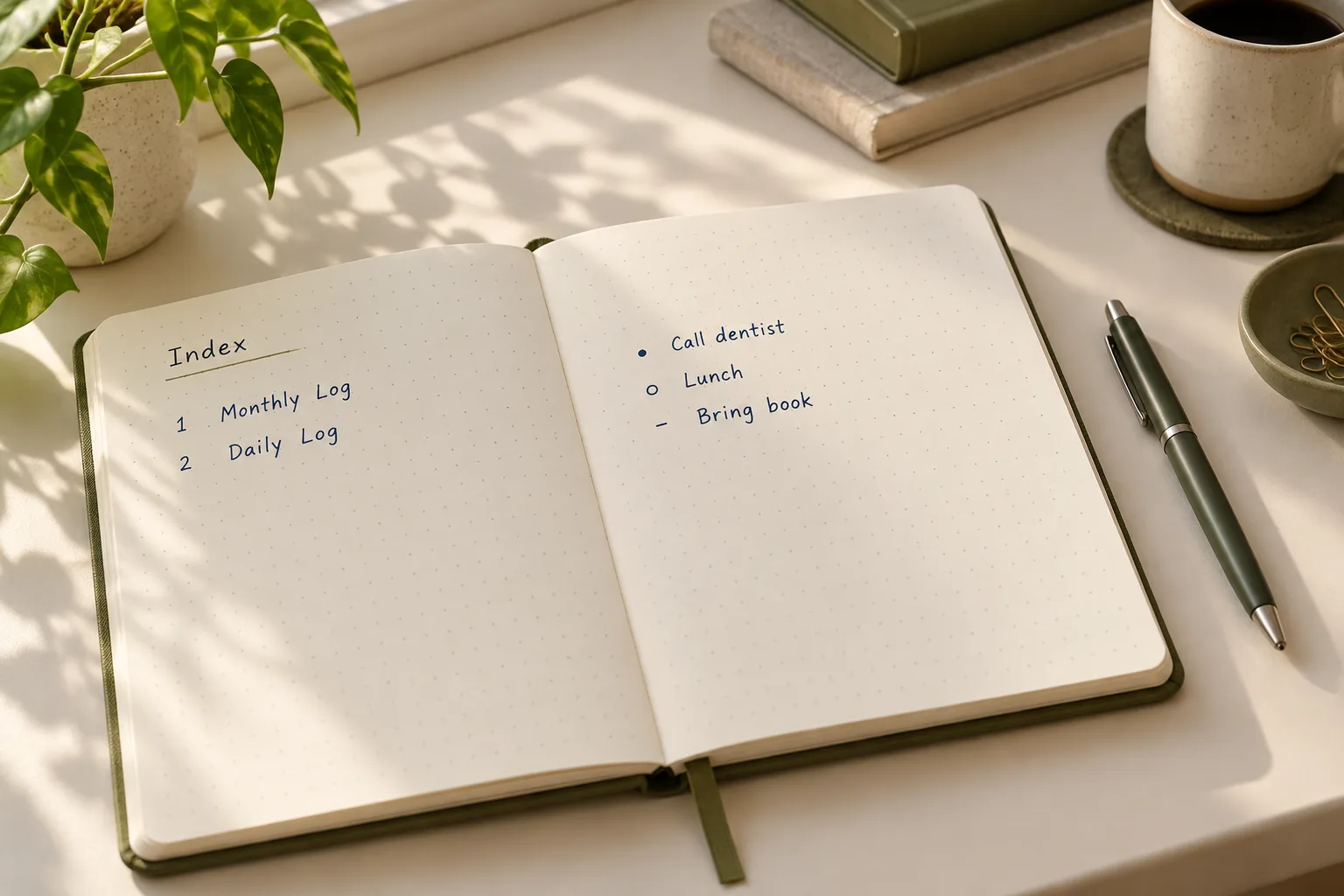
Free printable starter pack
Prefer printable pages? Get the free Small Pages starter pack: five simple designs in A5, A4, and US Letter. The library is open — free direct access, no signup needed.
On this page
- What do you actually need?
- How does the original method work?
- The five beginner pages
- Set up in 30 minutes
- How to use it after setup
- What to skip for now
- What is in the free starter pack?
- Beginner mistakes
- Limitations to know
- Frequently asked questions
What do you actually need to start a bullet journal?
Start with:
- A notebook: lined, dotted, squared, or blank.
- A pen: something comfortable that you can read easily.
- A few minutes: enough to write down what matters today.

A ruler is optional. So are page tabs, highlighters, stickers, and special journals.
If you already own a partly used notebook, begin on the next blank page. Number pages as you use them if they are not numbered already.
For loose printable pages, use a folder, binder, or clipboard. If you plan to paste a printable into a notebook, check its usable page area first: an A5 sheet may still need trimming to fit an A5 notebook.
Our suggestion: try the system with supplies you own before buying anything.
If you’re exploring different kinds of journaling, our Start Here guide can help you choose a comfortable starting point.
How does the original Bullet Journal method work?
Ryder Carroll created the Bullet Journal method. Its practical foundations include short entries called rapid logging, an index for finding information, a future log for later commitments, and migration for reviewing and moving relevant unfinished tasks. His official guide explains these foundations without requiring decorative pages.
In plain language:
- Capture: write a short task, event, or note.
- Find: use your index to locate pages later.
- Review: check what still needs your attention.
- Choose: complete, move, schedule, or remove an entry.
A page that gathers related information is called a collection. A monthly log is one example.
For this guide, we use five starter page types: Key + Index, Future Log, Monthly Log, Weekly Log, and Daily Log.
A useful distinction: Carroll’s core modules are the Index, Future Log, Monthly Log, and Daily Log. Our Weekly Log is an optional planning layer, and the combined Key + Index is our space-saving starter layout. You do not have to use every layer every day.
Which bullet symbols should a beginner use?
These basic marks distinguish entries and task states. The arrows record where you moved a task; they do not simply mean “unfinished.”
| Symbol | Meaning | How to use it |
|---|---|---|
| • | Task | An action: “Book appointment” |
| X | Completed task | Change the task bullet to an X when finished |
| > | Migrated task | Move the task into the next Monthly Log or another collection |
| < | Scheduled task | Move the task into the Future Log |
| – | Note | Record an idea, observation, or useful detail |
| ○ | Event | Record an appointment or something that happened |
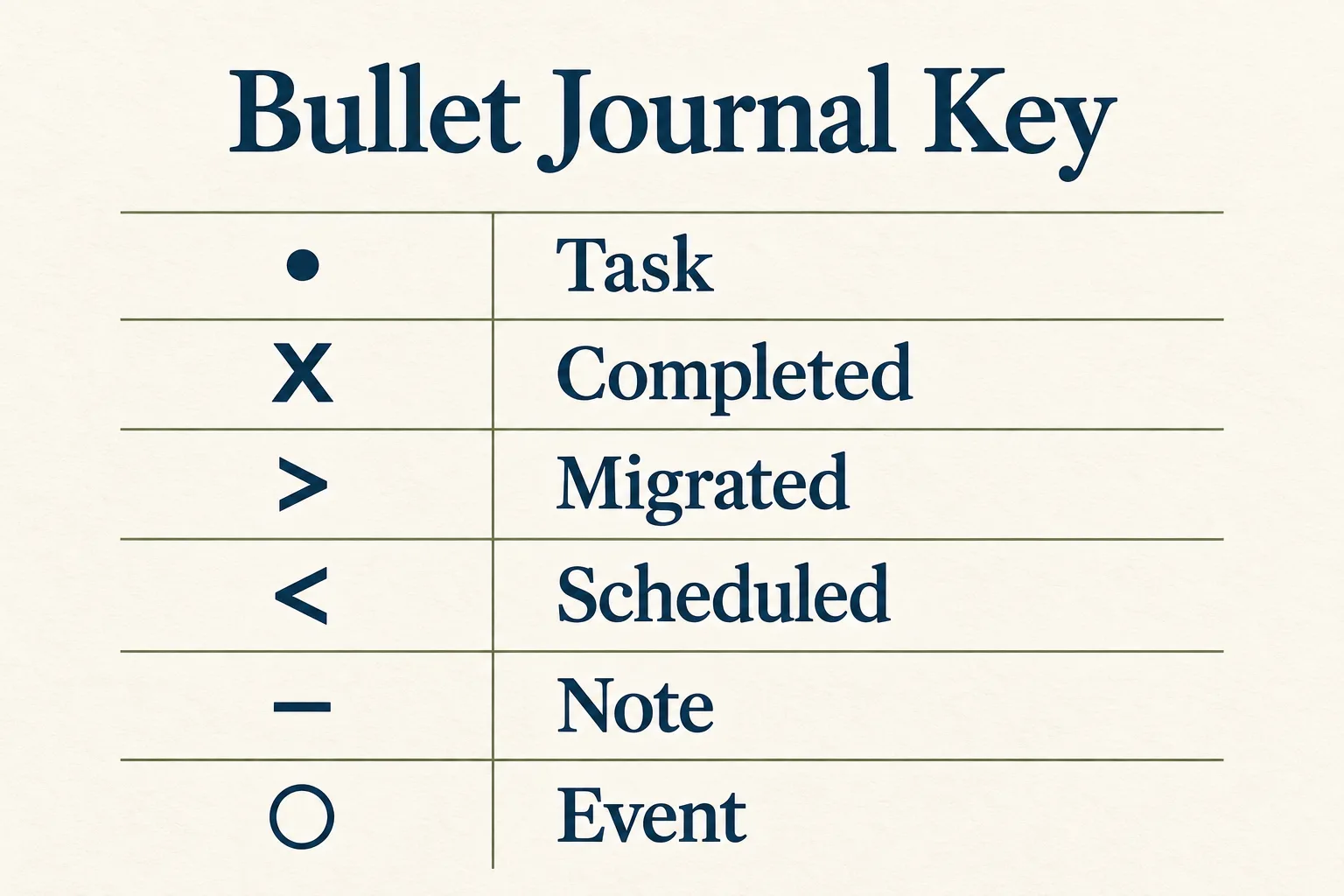
Technically, the dot, dash, and circle are bullets; X and the arrows show task states. Additional signifiers, such as priority marks, can wait.
You only need enough symbols to understand your own page.
Which five beginner bullet journal pages should you set up?
These five page types give information a clear place to go:
| Page type | Its job |
|---|---|
| Key + Index | Explain your symbols and help you find pages |
| Future Log | Hold commitments beyond the current month |
| Monthly Log | Show this month’s dates and tasks |
| Weekly Log | Offer an optional seven-day overview |
| Daily Log | Capture today’s tasks, events, and notes |
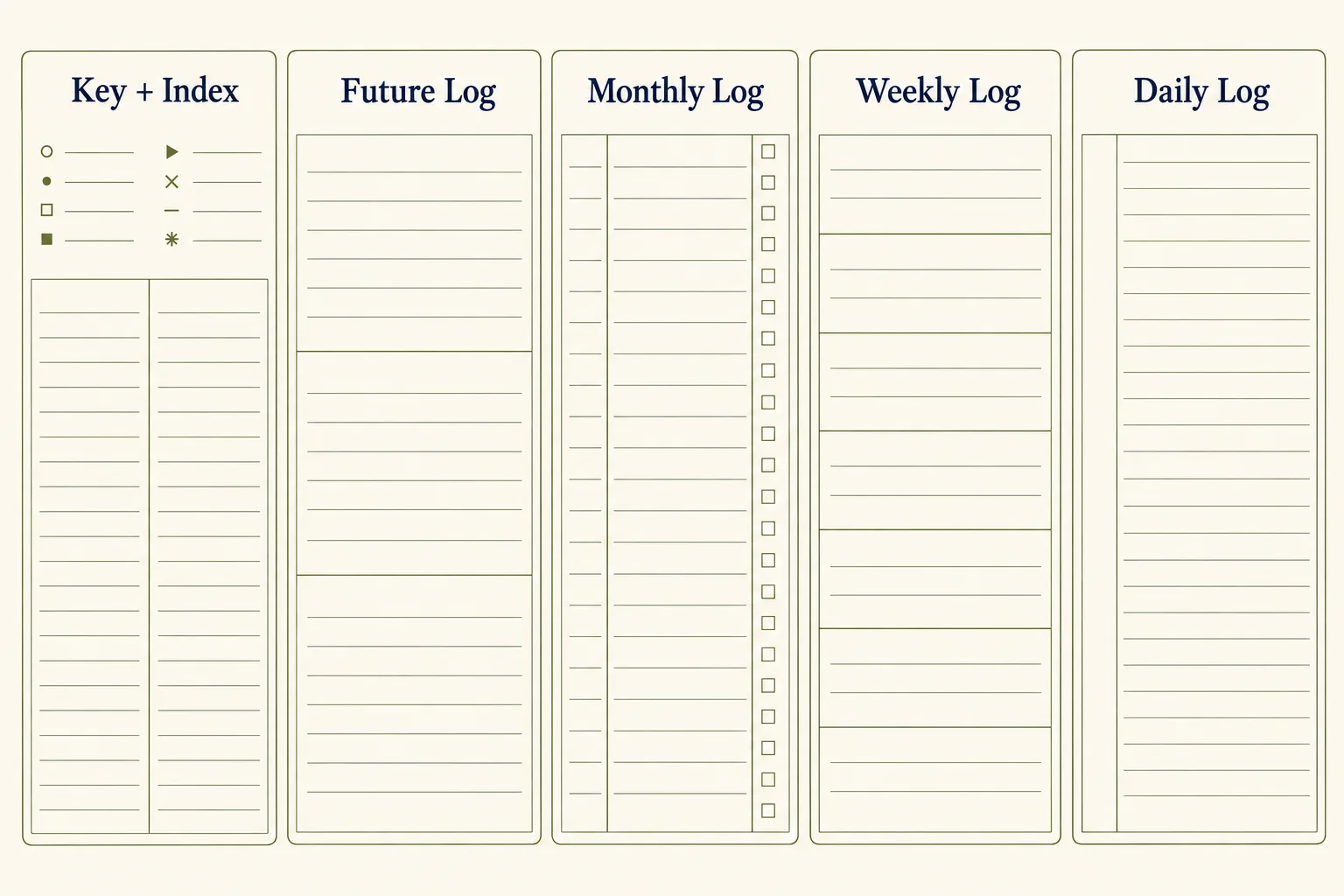
“Five pages” here means five designs, not a rule that your whole journal must fit on five sheets. You can repeat a design or let a handwritten log continue onto another page.
1. How do you set up a Key + Index page?
Purpose: keep your symbols and page references easy to find.
- Write Key + Index at the top of your first available page.
- Use the upper section for the six symbols in the table above.
- Below it, draw two columns labeled Page and Topic.
- Add a row whenever you create a page you’ll want to find again.
For example:
| Page | Topic |
|---|---|
| 2 | Future Log |
| 3 | November Monthly Log |
| 4 | Week of November 2 |
| 5–7 | Daily Logs |
Leave unused index rows blank. You do not need to predict every future page.
When the index fills, continue it on the next available page and note that location beside the original index.
2. How do you set up a Future Log?
Purpose: give later commitments a home without drawing months of calendars.
- Write Future Log at the top.
- Divide the page into three horizontal sections.
- Label each section with an upcoming month and year.
- Add known dates, deadlines, or tasks that belong in those months.
- Repeat the page when you need more months.
For example, if your current Monthly Log is November, your Future Log could begin with December, January, and February.
An entry might be:
○ Jan 12 — Dental appointment, 10 a.m.
Keep entries brief. You do not need to fill every line.
If you need to record something further ahead, create another Future Log page rather than squeezing it into the wrong month.
3. How do you set up a Monthly Log?
Purpose: see current-month commitments alongside tasks that need attention sometime this month.
- Write Monthly Log and add the month and year.
- Make a narrow date column numbered 1–31.
- Leave a wider space beside each number for dated entries.
- Add a separate This Month’s Tasks column.
- Transfer relevant commitments from your Future Log.
For a shorter month, cross out unused dates. Keep weekday labels off an undated printable so it works in any month.
Use the dated side for entries such as appointments. Use the task side for actions without a fixed day, such as “Arrange boiler service.”
Our compact layout places both sections on one page. If your handwriting or schedule needs more room, use two facing notebook pages instead.
For gentle seasonal inspiration once your basic setup works, explore our November bullet journal ideas. Choose one useful idea; you do not need to recreate an entire collection.
A small-page reminder: blank space is available space. You haven’t done anything wrong by leaving it empty.
4. How do you set up a Weekly Log?
Purpose: see the coming seven days together.
- Write Weekly Log and add the week’s starting date.
- Divide the page into seven equal horizontal boxes.
- Label them Day 1 through Day 7.
- Write the actual day and date in each box.
- Add appointments and only the tasks you expect to tackle that day.
This flexible layout lets you begin on any day.
Keep entries short. If a day becomes crowded, move its detailed notes to your Daily Log.
You can skip this page. If your Monthly Log and Daily Log already give you enough structure, there is no need to copy the same information into a weekly view.
Our recommendation is to test one week, then decide whether the overview earns its space.
5. How do you set up a Daily Log?
Purpose: capture what matters today without planning how much space the day will need.
- Write Daily Log and today’s date.
- Add tasks, events, and notes using your bullets.
- Leave entries in the order they occur.
- Continue on the next page whenever you run out of room.
- Briefly review open tasks before you finish.
Here is a sample, not a personal diary entry:
November 4
• Book appointment
○ Parcel pickup, 4 p.m.
– Ask about opening hours
You can write one entry or several. Full sentences are optional.
For a handwritten journal, start tomorrow’s entry below today’s when tomorrow arrives. Avoid drawing a month of fixed daily boxes before you know how much space you use.
If you’d like a reflection alongside your practical notes, choose one question from our journal prompts. It can stay on the same Daily Log page.
How can you set up a bullet journal in 30 minutes?
Treat this as a suggested timebox, not a speed test. Printing, trimming, or assembling pages may take extra time.
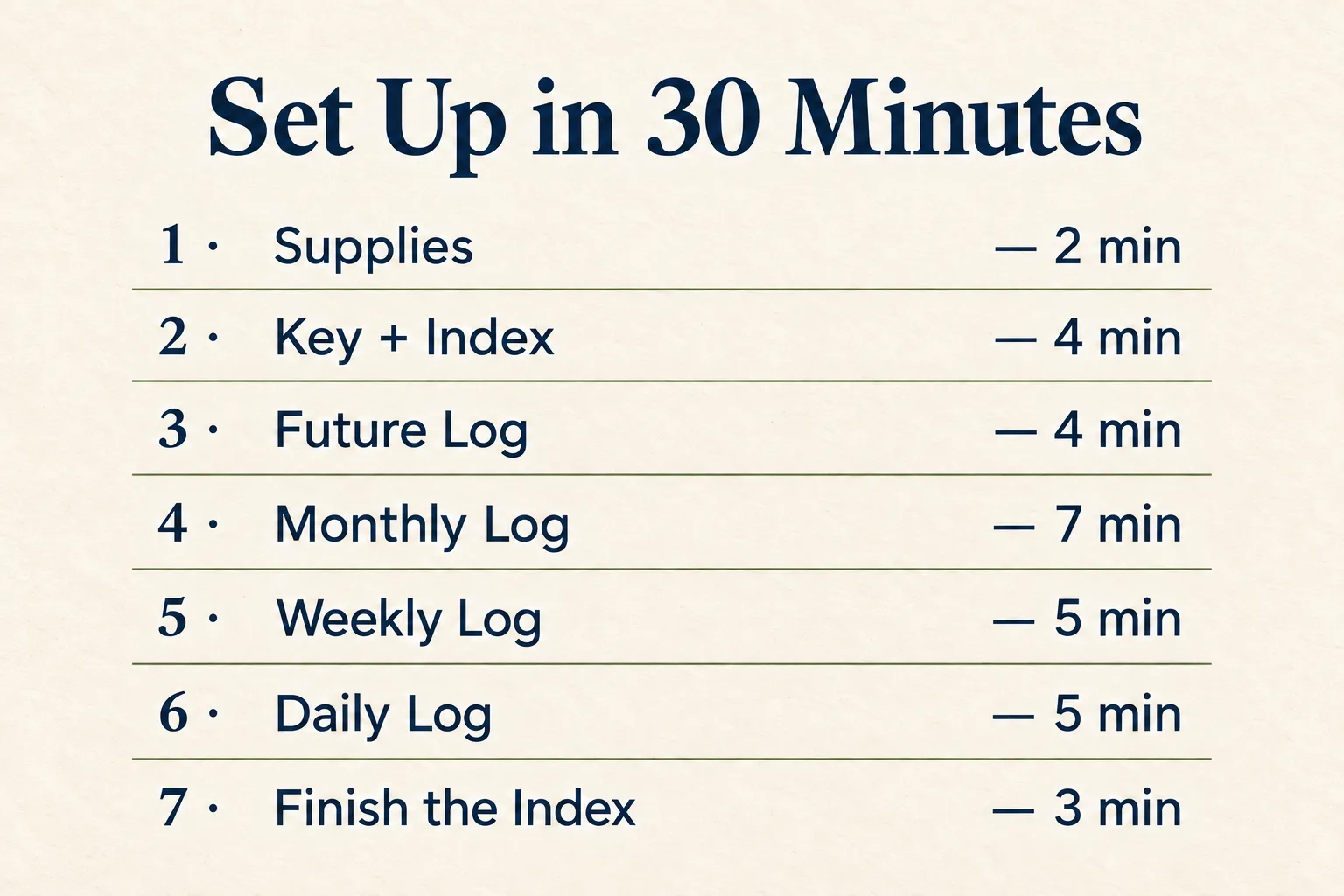
1. Choose your supplies — 2 minutes
Put one notebook and one pen on the desk.
Choose where the journal will live so you can reach it easily.
2. Create Key + Index — 4 minutes
Write the six basic symbols. Add the Page and Topic columns.
Number your starting pages.
3. Create a Future Log — 4 minutes
Draw three month sections. Add only commitments you already know.
4. Create this month’s Monthly Log — 7 minutes
Write the month, date list, and task column.
Add important dates and a short list of current tasks. Stop before turning it into a complete inventory of everything you might ever do.
5. Try one Weekly Log — 5 minutes
Create seven day boxes and add their dates.
Transfer the appointments you need to see together. If you decide against a weekly view, use these minutes to review your Monthly Log instead.
6. Start today’s Daily Log — 5 minutes
Write today’s date.
Add a few relevant tasks, any scheduled event, and a note if there is something you want to remember.
7. Finish the index and check your pages — 3 minutes
Record the page references.
Check that you can answer:
- Where does a later appointment go?
- Where do this month’s tasks go?
- Where will I write today’s notes?
That is your first bullet journal setup.
You can stop here. A cover page is optional.
How do you use your bullet journal after setup?
The pages give information a place to live. A brief review keeps that information useful.
When you begin your day: check current commitments and open today’s log.
During the day: capture short entries as needed.
When you finish: mark completed tasks and consider what remains relevant. An unfinished task can stay open until your next review; it does not have to be rewritten automatically every evening.
What is migration, and when should you do it?
Migration means reviewing entries and moving forward the ones that still matter. At a month change, check unfinished tasks and relevant Future Log entries before building the new Monthly Log. Carroll describes this as a deliberate opportunity to reconsider commitments.
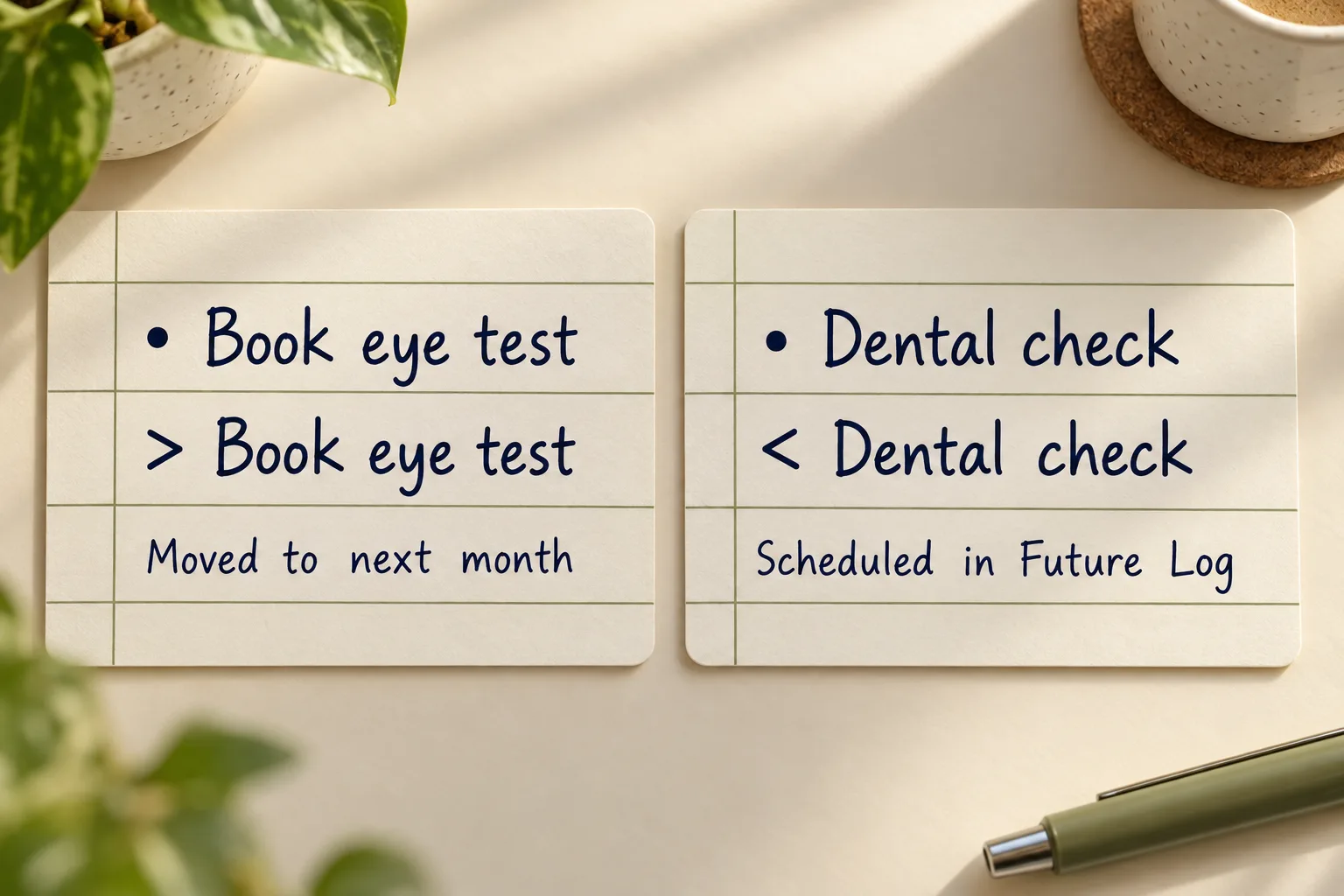
Ask of each unfinished task:
- Is it complete? Mark it X.
- Does it still matter? If it no longer matters, cross it out.
- Does it belong in the new month? Rewrite it there, then mark the original >.
- Does it belong in a later month? Put it in the Future Log, then mark the original <.
For example, if “Book eye test” belongs in January, write it in January’s Future Log section before marking its original bullet <.
Always record the destination entry before marking the move. That way, the arrow points to something that actually exists.
What should you skip for now?
When you search for bullet journal ideas, you may find beautiful pages for every part of life. Treat them as options.
For your first setup, defer:
- Decorative cover pages.
- Elaborate lettering or illustrations.
- Multiple color codes.
- Mood, water, sleep, spending, and exercise trackers.
- Reading lists, wish lists, and other extra collections.
- A full year of predrawn daily layouts.
- Copying the same task into monthly, weekly, and daily pages.
Keep your first setup within the five page types above. Even the Weekly Log can wait.
After you have used the basic pages, ask: What information am I repeatedly wishing I had?
That question can guide your next addition. If you later want to track one specific routine, our habit tracker printable offers a separate option. You can also browse habit trackers when that becomes useful.
For ready-made planning formats, explore our planners. Browsing can wait until after today’s first entry.
What is included in the free printable starter pack?
The free pack contains 15 separate PDF files: five designs, each in A5, A4, and US Letter. The files are free in The Small Pages Library — no signup needed.
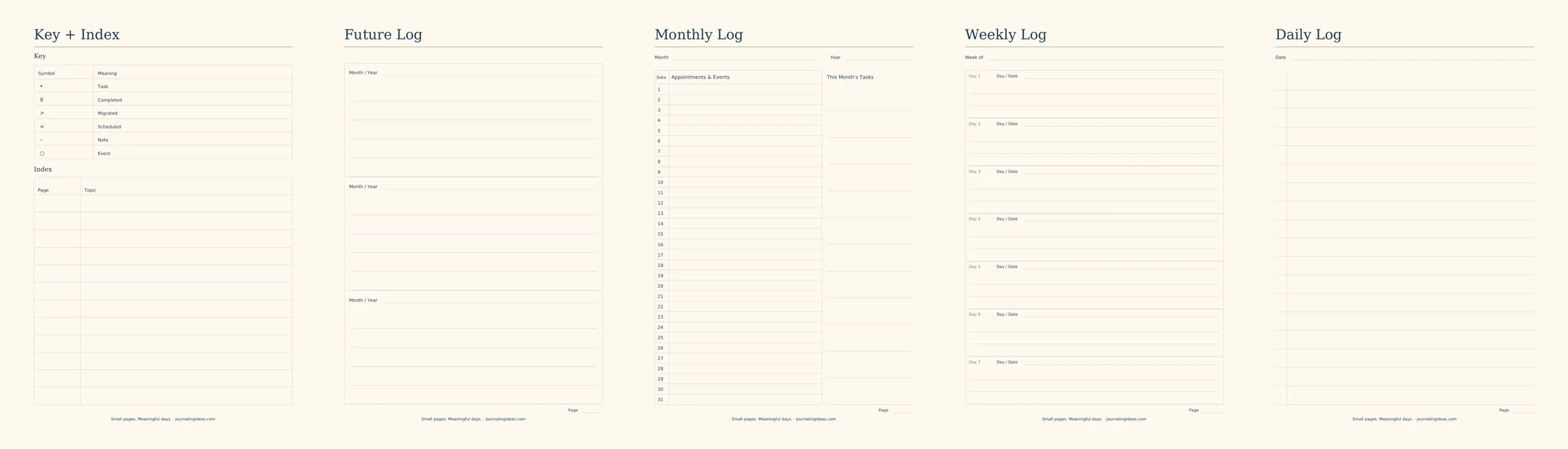
Every design is portrait, undated, and intended for handwritten use. All sizes use the same headings, fields, and row counts, with more writing room on larger paper.
Key + Index printable
- Main heading: Key + Index.
- Upper section heading: Key.
- Two columns labeled Symbol and Meaning.
- Six rows: • Task, X Completed, > Migrated, < Scheduled, – Note, and ○ Event.
- Lower section heading: Index.
- Two columns labeled Page and Topic.
- Twelve blank index rows.
- Footer: journalingideas.com.
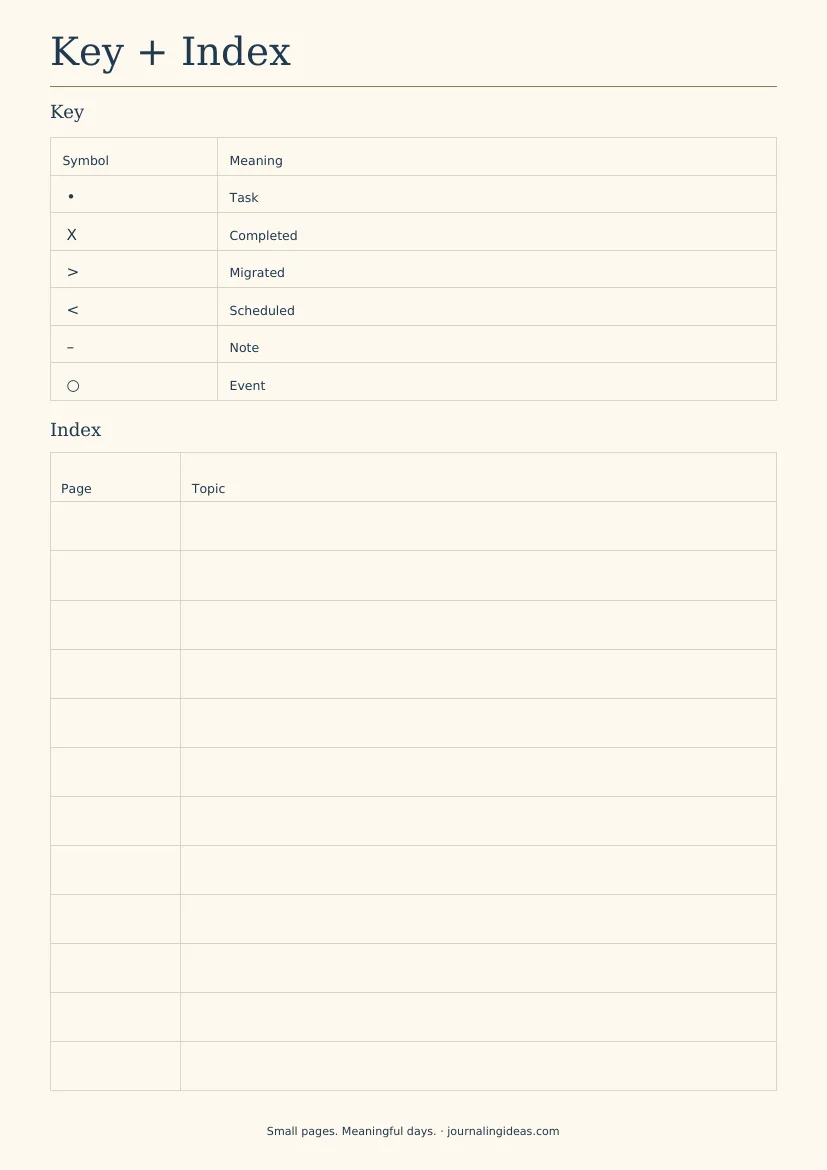
The Page column is narrow; the Topic column takes the remaining width.
Future Log printable
- Main heading: Future Log.
- Three equal horizontal sections.
- Each section has a Month / Year field.
- Each section contains five ruled entry lines.
- Bottom-right field: Page.
- Footer: journalingideas.com.
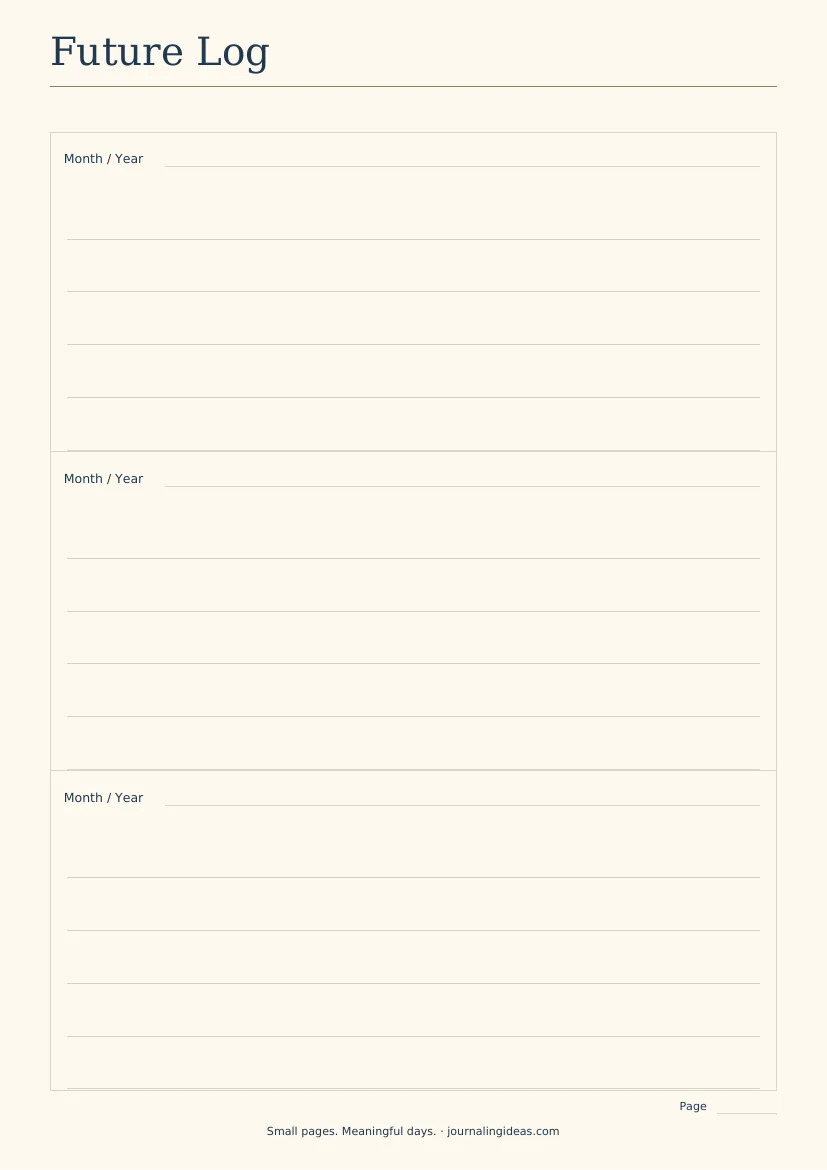
Print another copy whenever you need three more months.
Monthly Log printable
- Main heading: Monthly Log.
- Top fields: Month and Year.
- Left section: approximately two-thirds of the writing width, with column headings Date and Appointments & Events.
- Thirty-one rows numbered 1–31.
- Right section: approximately one-third of the writing width, headed This Month’s Tasks.
- Twelve ruled task lines.
- No weekday names.
- Bottom-right field: Page.
- Footer: journalingideas.com.
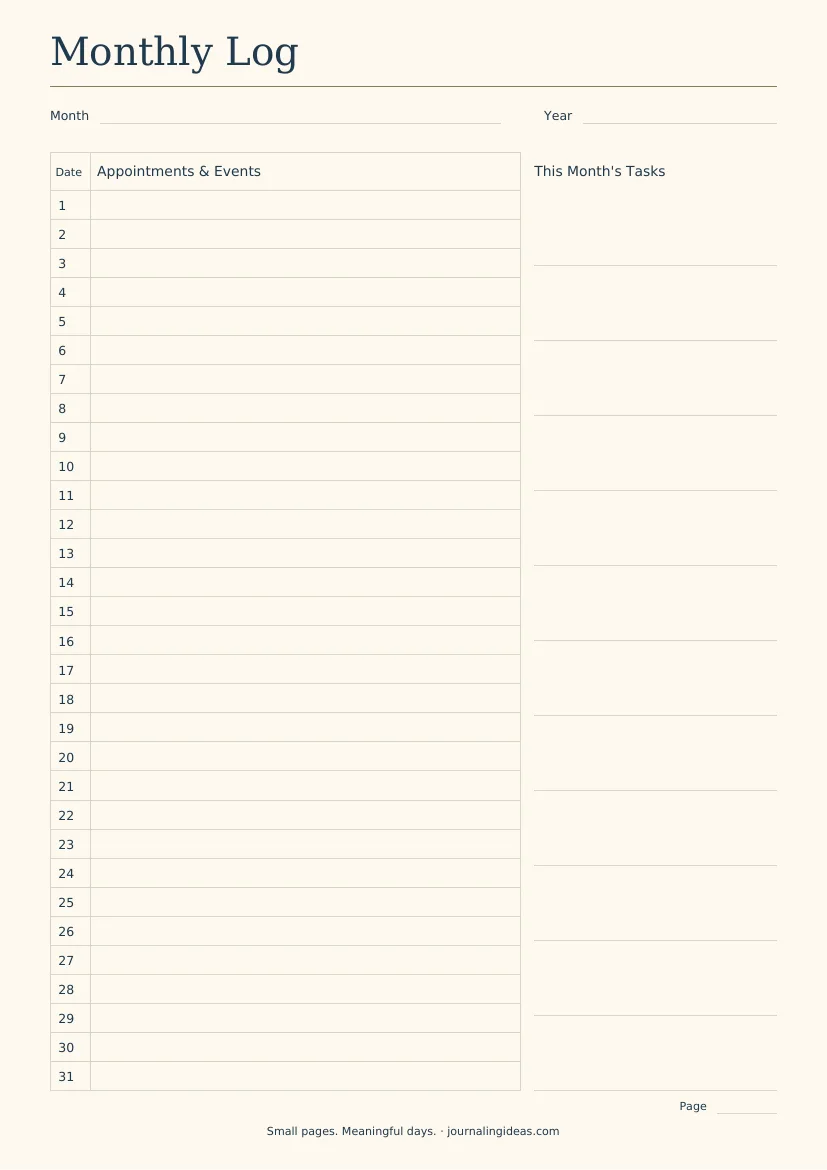
Cross out dates that do not occur in your chosen month. The date rows suit brief entries; use your Daily Log for longer details.
Weekly Log printable
- Main heading: Weekly Log.
- Top field: Week of.
- Seven equal horizontal boxes labeled Day 1 through Day 7.
- Each box has a Day / Date field.
- Each box contains three ruled entry lines.
- Bottom-right field: Page.
- Footer: journalingideas.com.
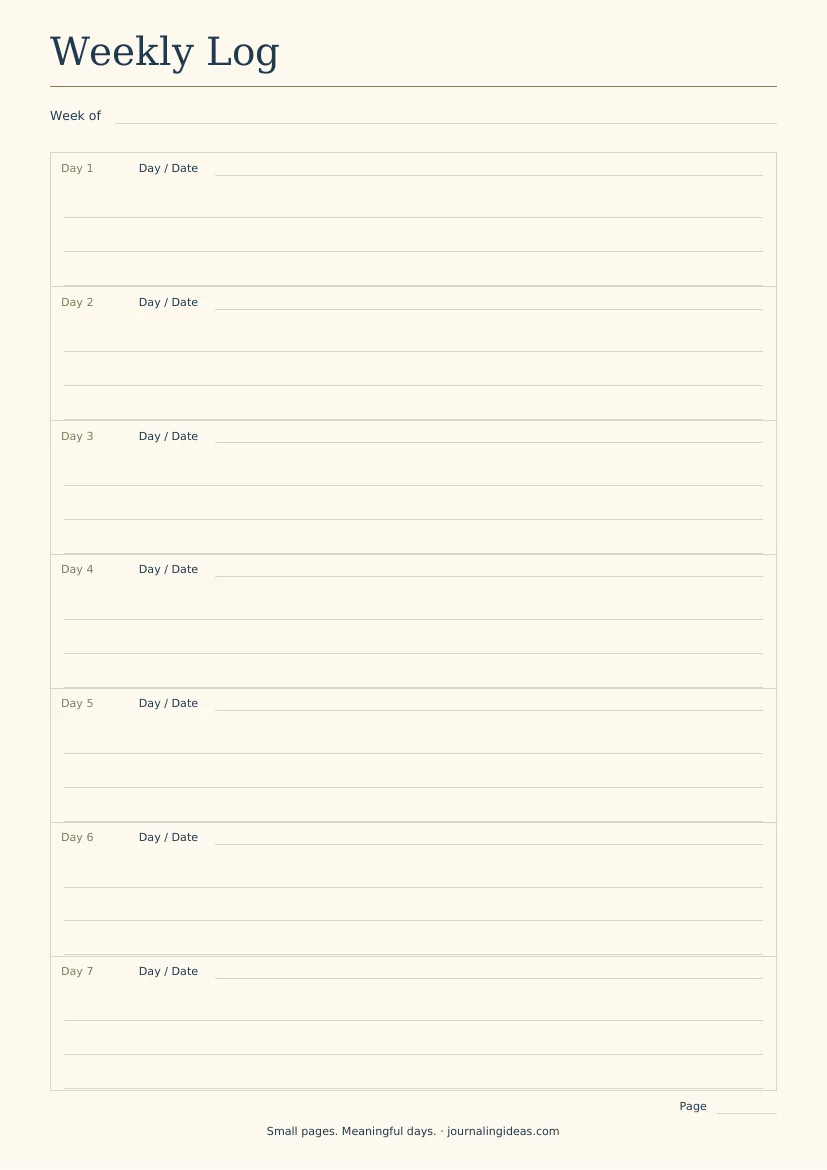
Fill in your own day names and dates. You can start on Monday, Sunday, or another day.
Daily Log printable
- Main heading: Daily Log.
- Top field: Date.
- One undivided writing area containing eighteen ruled lines.
- A narrow, unlabeled left gutter for bullet symbols.
- No separate task, event, or note boxes.
- Bottom-right field: Page.
- Footer: journalingideas.com.
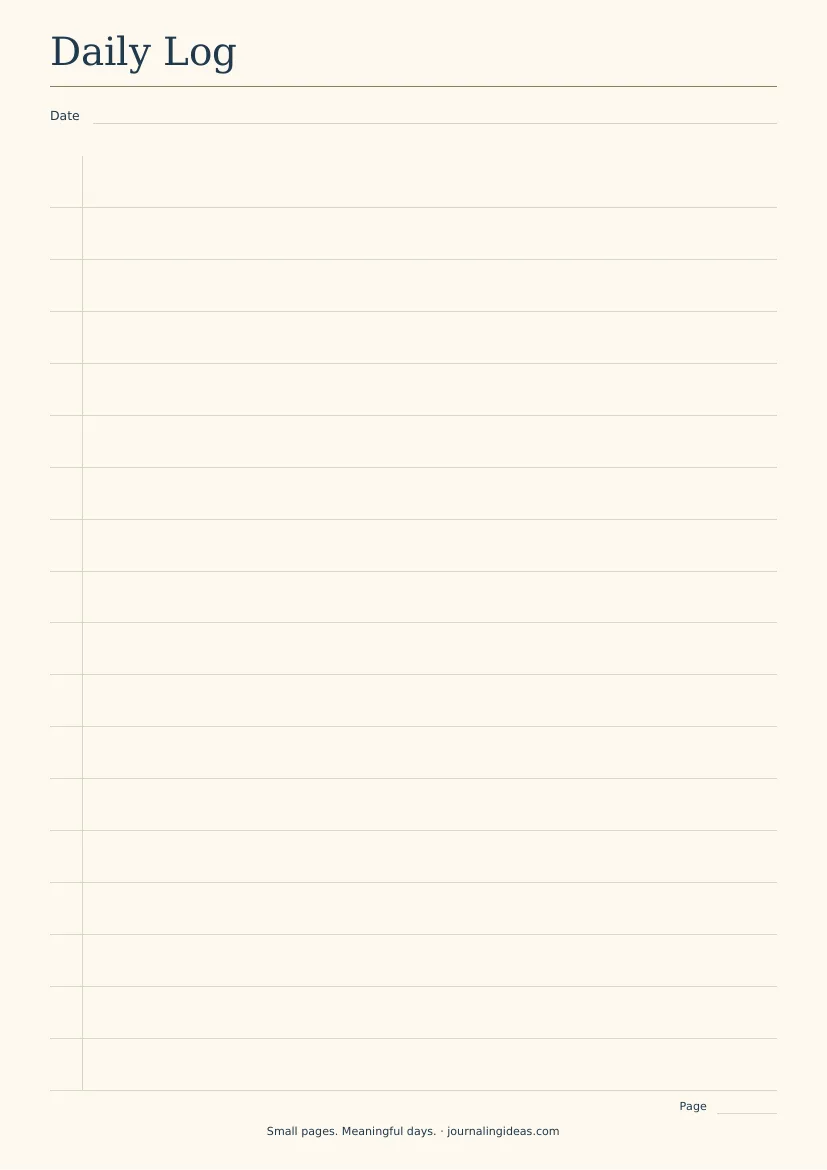
Use the same writing area for all entry types. Continue on another copy if needed.
How do you access and print the pack?
- Open The Small Pages Library.
- Choose the Bullet Journal Starter Pack.
- Choose the A5, A4, or US Letter version.
- Download the pack.
- Print at Actual size or 100%.
For full-size printing, select the matching paper size and start with Actual size or 100%. Check the preview before printing all the pages. If your printer clips the edges, use Fit to printable area; this may make the page slightly smaller.
You can also browse our free printables for more pages.
Which beginner mistakes make the system harder to use?
These are practical failure patterns to watch for, rather than claims about a measured number of beginners.
| Pattern | Why it creates friction | A gentler adjustment |
|---|---|---|
| Designing everything before using anything | You cannot yet tell which layouts fit your days | Set up the basics and try today’s log |
| Putting the same task on three pages | Updates become easy to miss | Keep detail in one place and use other views selectively |
| Planning every day into a tiny box | Busy days run out of room | Let Daily Logs continue onto another page |
| Adding too many symbols | Reading the journal requires decoding | Stay with the basic marks |
| Recopying unfinished tasks automatically | The same commitment can drift forward without a decision | Review whether to do, schedule, simplify, or remove it |
| Abandoning a page after an error | A usable page becomes wasted effort | Cross out the error and continue |
| Tracking routines without a clear purpose | Maintaining the tracker becomes another task | Defer it until it answers a specific question |
Another easy trap is keeping critical appointments only in a closed notebook.
Paper does not send reminders. Use a phone or calendar alert when missing a time-sensitive commitment would matter.
What are the limitations of a bullet journal?
A bullet journal asks you to review it. If you rarely open the notebook, its lists and plans cannot help much.
Other limits are worth considering:
- Manual updates: paper entries do not sync across devices.
- Repeated writing: migration takes effort.
- Fixed printable space: a template may be too small for your handwriting or schedule.
- Privacy: a notebook or loose page can be misplaced.
- Shared planning: a paper journal may be awkward for coordinating with other people.
You can use a mixed approach: digital reminders for appointments, paper for everyday notes and decisions.
You can also stop using a page that creates more work than it saves. The layout is adjustable.
Frequently asked questions about starting a bullet journal
Do I need a dotted notebook?
No. Lined, squared, blank, and dotted notebooks can all hold the same logs. Choose something you can write in comfortably.
Dots can help with alignment, but you can begin without them.
Can I start in the middle of a month or year?
Yes. Start your Daily Log with today’s date. On the Monthly Log, use the remaining dates and leave earlier ones blank or cross them out.
Your Future Log can begin with the next month.
Do I need both a Weekly Log and a Daily Log?
No. A Weekly Log offers an overview; a Daily Log gives entries room to expand.
Try both only if they serve different purposes. If you keep copying the same information, simplify.
What if I miss several days?
Write today’s date on the next available line or page.
Check for commitments that still need attention, then continue. You do not need to reconstruct every missed day.
Can I bullet journal if I dislike drawing or long writing?
Yes. Use plain headings and short entries such as “Call dentist” or “Parcel arrived.”
You can leave decoration out entirely. Our suggested starter pages need only labels, lines, and bullets.
How do I get the free printable starter pack?
No signup is needed — The Small Pages Library is open. Inside, choose the five starter designs in A5, A4, or US Letter.
What is the smallest useful start you can make today?
Open a notebook. Write today’s date. Add one task, one event, or one note.
Then give your information somewhere to go: later commitments in the Future Log, current-month plans in the Monthly Log, and everyday entries in the Daily Log.
You can build the index as you go. You can test a weekly view. You can leave the decoration for another day—or leave it out.
If drawing layouts is the part holding you back, get the free starter pack from The Small Pages Library. Choose one size and begin with today’s Daily Log.
Save this guide to your Bullet Journal for Beginners board if you’d like to return to the setup steps.
Small pages. Meaningful days.
About the publisher: The Journaling Ideas Editorial Team creates journaling ideas and printable planning pages with simple instructions for beginners.
4 Comments